
For simulating complex fluid flow involving moving parts or intricate overlapping geometries, traditional conformal and deforming mesh options can struggle to achieve accuracy and efficient results. Heavy mesh deformation often leads to negative cell volumes, forcing the solver to stop and remesh, which carries high computational costs. This is where overset meshing in ANSYS Fluent offers a flexible solution.
This guide covers the overset mesh definition, its setup in ANSYS Fluent, how to diagnose and fix orphan cells, and how it compares with other moving-body meshing tools. By understanding the overset method, engineers can bypass the limitations of traditional moving grids and simulate complex, large-displacement industrial problems accurately.
The Overset Method
An overset mesh allows for overlapping mesh domains to exist independently of one another without requiring a shared conformal interface. In this setup, a component mesh (often containing the moving solid body) moves freely relative to a background mesh.
This approach, originally developed as the chimera grid scheme by Steger and Benek, provides an alternative to conformally connected cell zones and non-conformal interfaces. It is highly beneficial for simulating moving objects, such as aircraft store separation or vehicles with moving wheels, completely eliminating the need for dynamic remeshing.
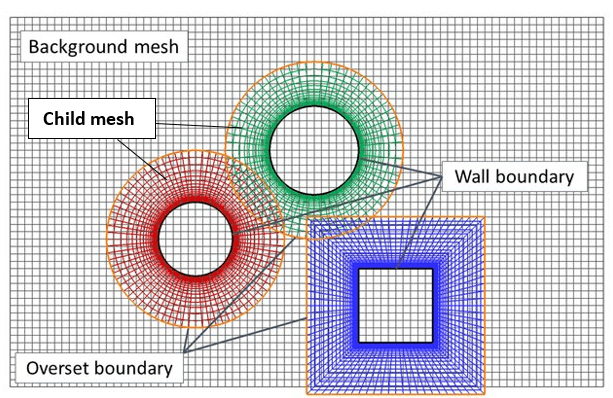
Figure 1: Overset mesh methodology applied to a helicopter rotor head. Source: [Pölzlbauer P, et al. Aerospace 2021]
The Importance of Overset Meshing
Meshing techniques involving complex conformal connections often cause grid generation bottlenecks, especially when the geometry has multiple moving bodies. While moving boundaries can be handled by dynamic mesh algorithms, they often lead to high computational costs and cell-quality degradation. The overset technique, which has been continuously improved in ANSYS Fluent since Release 18.0, resolves this issue by keeping the background and component meshes rigid and independent, relying entirely on solver-side interpolation.
Applications of Overset Mesh in Industry
Overset mesh has various applications across industries where large relative motion occurs:
- Aerospace Engineering: Simulating aircraft with moving parts, store separation, or advanced aerodynamics.
- Automotive Engineering: Simulating interactions between steering wheels and the vehicle body.
- Marine Applications: Simulating the movement of propellers, rudders, and ship hulls in rough seas.
- Wind Energy: Pitching and rotating wind turbine blades.
Overset Mesh in ANSYS Fluent
By implementing overset meshes in ANSYS Fluent, the limitations of conformal meshing and sliding interfaces are overcome. The grids simply slide over each other, and Fluent automatically handles the interpolation between them, making large-displacement simulations vastly more efficient.
 Figure 2: Water Entry of Dimpled Sphere CFD Simulation is a moving-body simulation by CFDLAND showcasing the capability to handle interactions.
Overset Mesh Terminology
Before defining the setup steps, it is critical to understand how ANSYS Fluent classifies cells once an overset interface is initialized.
- Background Mesh: The stationary global domain. Background zones cannot have overset boundaries on their outer edges.
- Component Mesh: The independent mesh built around the moving or complex geometry. It overlays the background mesh.
- Dead Cells: Cells that fall outside the active computational domain (e.g., inside a solid body). The solver ignores them.
- Solve Cells: Active cells where the Navier-Stokes flow equations are computed.
- Receptor Cells: Cells that receive interpolated data from another overlapping mesh. They form the boundary of the solve region.
- Donor Cells: A subset of solve cells that provide the data to the receptor cells.
- Orphan Cells: Receptor cells that fail to find a valid donor. An orphan cell causes solver instability.
Overset Domain Connectivity Setup
Fluent establishes connectivity between the participating zones when the overset interface is initialized. The software automatically executes three sequential steps:
Hole Cutting
Hole cutting is the process of marking dead cells outside the flow region. The solver marks all cells cut by physical boundary zones (walls) and plants “seed cells” inside the solid bodies. It then uses flood-filling to mark all enclosed cells as dead. By applying flood-filling, the solver separates the active flow region from the excluded solid regions.
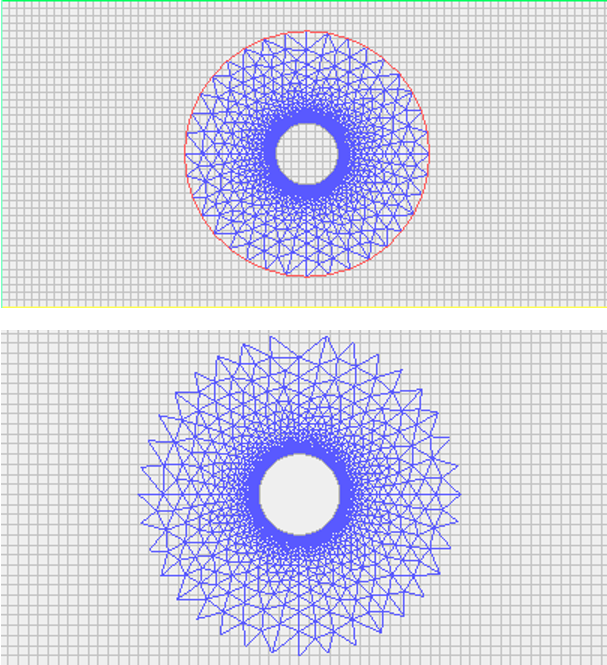
Figure 3: Overset component and background meshes before and after hole cutting. Credit: ANSYS Fluent User’s Guide
Overlap Minimization
To avoid solving equations in unnecessarily overlapping regions, Fluent converts extra solve cells into receptor cells and turns unnecessary receptors into dead cells. By default, donor priority is based on cell size (smaller cells are favored). However, if both meshes have nearly identical resolution, you should change the donor priority to Boundary Distance via the text user interface (TUI). Additionally, users can assign Grid Priorities to force the solver to favor one specific mesh over another.
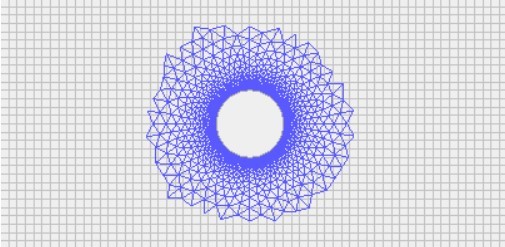
Figure 4: Overset Component and Background Meshes After Overlap Minimization.
Donor Search
The donor search is the final step. Fluent searches the overlapping mesh for valid solve cells to feed data to each receptor. A successful donor search requires at least one valid donor cell per receptor. Crucially, there must be a minimum of four cells in the overlap gap between boundaries to maintain continuity.
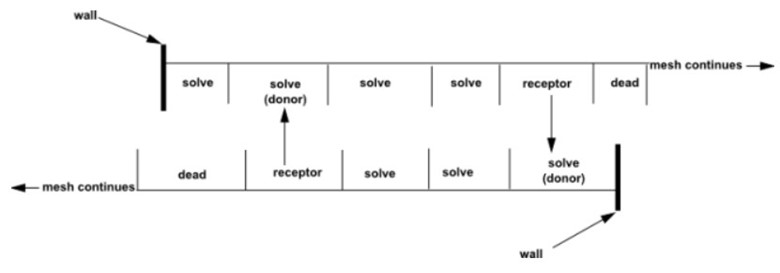
Figure 5: Valid Overlap definition
Overset Mesh Validation & Case Studies
Proving that overset interpolation preserves physical accuracy is critical for research and industrial applications. A prime example of this accuracy in action is the Standard Dynamic Model (SDM) overset grid simulation validated against experimental data. In this CFDLAND project, an overset grid was utilized to simulate a canonical wind-tunnel pitching geometry, and the aerodynamic coefficients matched the published experimental wind tunnel data perfectly, proving that overset interpolation does not degrade force prediction.

Figure 6: Simulating canonical wind-tunnel pitching geometry using overset mesh technique to validate experimental tunnel data
Diagnosing Overset Interface Problems
The topology detection in Fluent is automatic, but if the meshes are poorly designed, initialization will fail.
Orphan Cells Fluent Diagnostics: If a receptor cell cannot find a valid donor, it becomes an “orphan cell.” This almost always indicates insufficient overlap between the meshes or a massive size mismatch between the component and background cells. If the wall of a component mesh gets too close to the wall of a background mesh (less than 4 cells across the gap), orphan cells will appear. You must refine the donor mesh to fix this, not the mesh containing the orphan.
Flood Filling Fails (Dead Zones): If an entire fluid region incorrectly turns into dead cells, the hole-cutting flood fill has leaked. This happens when the overlapping boundaries between two component meshes do not match closely enough. Fluent’s tolerance is exactly one cell size in the wall-normal direction. If the gap between overlapping walls exceeds this, the flood fill leaks out and kills the fluid zone.
Overset Mesh Adaption
To fix orphan cells and resolve narrow gaps, ANSYS Fluent allows you to link overset interfaces directly with adaptive mesh refinement (AMR). Using overset-specific adaption, the solver will automatically evaluate the Overset Donor Size Ratio. If a donor cell is massively larger than its receptor, the solver marks it for refinement. You can also enable Gap Adaption, which automatically refines the mesh in narrow regions to ensure the strict 4-cell minimum rule is met dynamically as bodies move close together.
Overset Mesh vs Sliding Mesh vs Dynamic Mesh: Which to Use?
Selecting the right moving-mesh technology depends entirely on the type of motion and the complexity of the geometry.
| Technology | Mesh Deformation? | Interface Requirement | When to Choose |
|---|---|---|---|
| Overset Mesh | No (Rigid meshes) | Free overlap, interpolation | Complex large-displacement motion (store separation, pitching wings). |
| Sliding Mesh CFD simulations | No (Rigid meshes) | Strict non-conformal interface | Steady rotation with a fixed interface (fans, turbines). |
| Dynamic Mesh | Yes (Layering, remeshing) | Conformal boundaries | Expanding/contracting volumes (engine pistons, valves). |
| MRF | No (Frozen rotor) | Steady-state zones | Simple rotational approximations where transient interactions are not required. |
Note: Overset technology works seamlessly with both hexahedral and tetrahedral cells. For a deeper breakdown of basic cell topologies, refer to our complete guide on mesh types.
Overset Meshing Best Practices
- Size Matching: Ensure receptor and donor cell sizes are roughly equal in the overlap region to minimize interpolation errors.
- Pressure-Velocity Coupling: For overset meshes, the Coupled scheme is strongly recommended over segregated schemes (SIMPLE) for stability.
- Grid Independence: The 4-cell overlap rule is a strict connectivity requirement. It does not replace the need for a formal grid independence study to ensure the flow physics are resolved.
- Double Precision: Always use the double-precision solver to avoid truncation errors during interpolation.
Overset Meshing Limitations in ANSYS Fluent
While powerful, overset meshing has strict compatibility limits:
- Component zones cannot have periodic boundary conditions.
- Background zones cannot feature overset boundaries.
- Solid cell zones are not supported inside the overset interface.
- It is not supported for strictly incompressible flows in a fully closed domain.
- FMG (Full Multigrid) initialization cannot be used.
Conclusion
Overset mesh technology has completely changed fluid flow simulations involving moving parts and complex overlapping geometries. By eliminating grid deformation and dynamic remeshing failures, the overset method enhances simulation accuracy, reduces manual meshing time, and provides unparalleled flexibility for large-displacement aerodynamics and hydrodynamics.
When applied with the correct hole-cutting limits, donor priorities, and gap resolutions, ANSYS Fluent’s overset framework is highly robust. If you require expert implementation of moving-body meshes for an industrial or academic study, you can order your CFD project directly with the CFDLAND engineering team to ensure reliable, high-quality results.
Frequently Asked Questions (FAQ)
- Is overset mesh interpolation conservative? Interpolation across an overset interface is generally non-conservative. However, in ANSYS Fluent, the mass and momentum errors generated at the overlapping fringe are usually negligible if the donor and receptor cells are of similar size and the flow gradients in the overlap region are properly resolved.
- Can overset mesh be combined with 6DOF or dynamic mesh motion? Yes. Overset meshing is frequently combined with the Six Degree of Freedom (6DOF) solver. The component mesh remains rigid and moves as a single solid block based on aerodynamic forces, sliding freely over the background mesh without triggering cell deformation or remeshing algorithms.
- Which ANSYS Fluent version do I need for overset meshing? Overset meshing was first introduced in ANSYS Fluent Release 18.0. However, significant improvements to overlap minimization, gap adaption, and multiphase compatibility have been added in subsequent versions. Using the latest available release is strongly recommended for overset stability.
2 thoughts on “Overset Mesh in ANSYS Fluent: Setup, Orphans, Best Practices”
Can I ask a quick question about your site?
Roheify
Hello!
Thank you for reaching out to us. We’re happy to help with any questions you have about our site. Please feel free to ask your question, and we’ll do our best to assist you.
Looking forward to hearing from you!
Best regards,
CFDLAND Group