

Finding and treating dangerous cancer safely is a very important job for medical doctors. When a cancer tumor grows inside the human body, it generates much more heat than healthy tissue because it uses a massive amount of blood energy. To see this hidden heat without cutting the skin with a knife, smart engineers use a highly accurate Breast Tumor Thermal CFD Simulation. This safe computational representation solves complex biological math to show exactly how the heat moves through the skin.
Instead of doing dangerous and painful physical tests on a living human, designers use software to mathematically look inside the body. This specific engineering process is incredibly important for creating safe heating machines that destroy cancer cells, which is known as hyperthermia treatment. To learn more about how engineers safely test complex medical devices inside the human body, we highly encourage you to explore our professional Biomedical CFD tutorials. By practicing this exact tutorial project, medical manufacturers can design better treatment tools to protect healthy skin and successfully save lives.
- Reference: Paruch, Marek. “Mathematical modeling of breast tumor destruction using fast heating during radiofrequency ablation.” Materials1 (2019): 136.
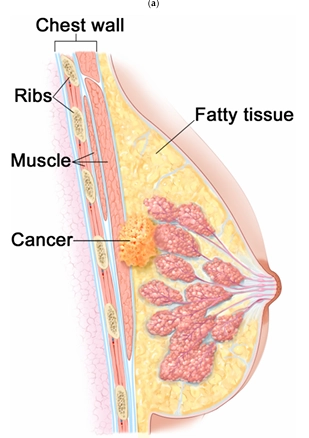
Figure 1: Anatomy of a breast with cancer, showing the physical biological layers of muscle, fat, and glandular tissue surrounding the hot tumor center.
Simulation Process: Pennes Bioheat Equation and Boundary Setup
For this medical engineering project, we built a precise 2D geometry of a cross-section of a human breast. Inside the ANSYS Fluent software, we carefully divided this biological tissue into four different layers. We defined 20% of the space as muscle at the chest wall, 60% as middle glandular tissue, and 20% as outer fat. Finally, we placed a 2 cm round tumor sitting right in the center. To simulate the living human body accurately, we used the famous Pennes bioheat equation into the fluid solver.
We set the inner core body boundary to a normal, healthy warm temperature of exactly 37 °C. Because the tumor grows very fast, we set its starting temperature to a hot 38.5 °C. Next, we applied a convection cooling boundary on the outer skin to match a standard cold hospital room. We set the room air temperature to exactly 25 °C and applied a skin heat transfer coefficient of exactly 13.5 W/m²K.
Figure 2: Computational mesh grid of the 2D breast model, displaying the divided computer cells used by the software to calculate the heat transfer exactly.
Post-processing: Analysis of Tissue Temperature Contours
This section provides a skillful engineering analysis of the computer results. We carefully read the exact temperature contours to explain the thermal behavior to medical device manufacturers.
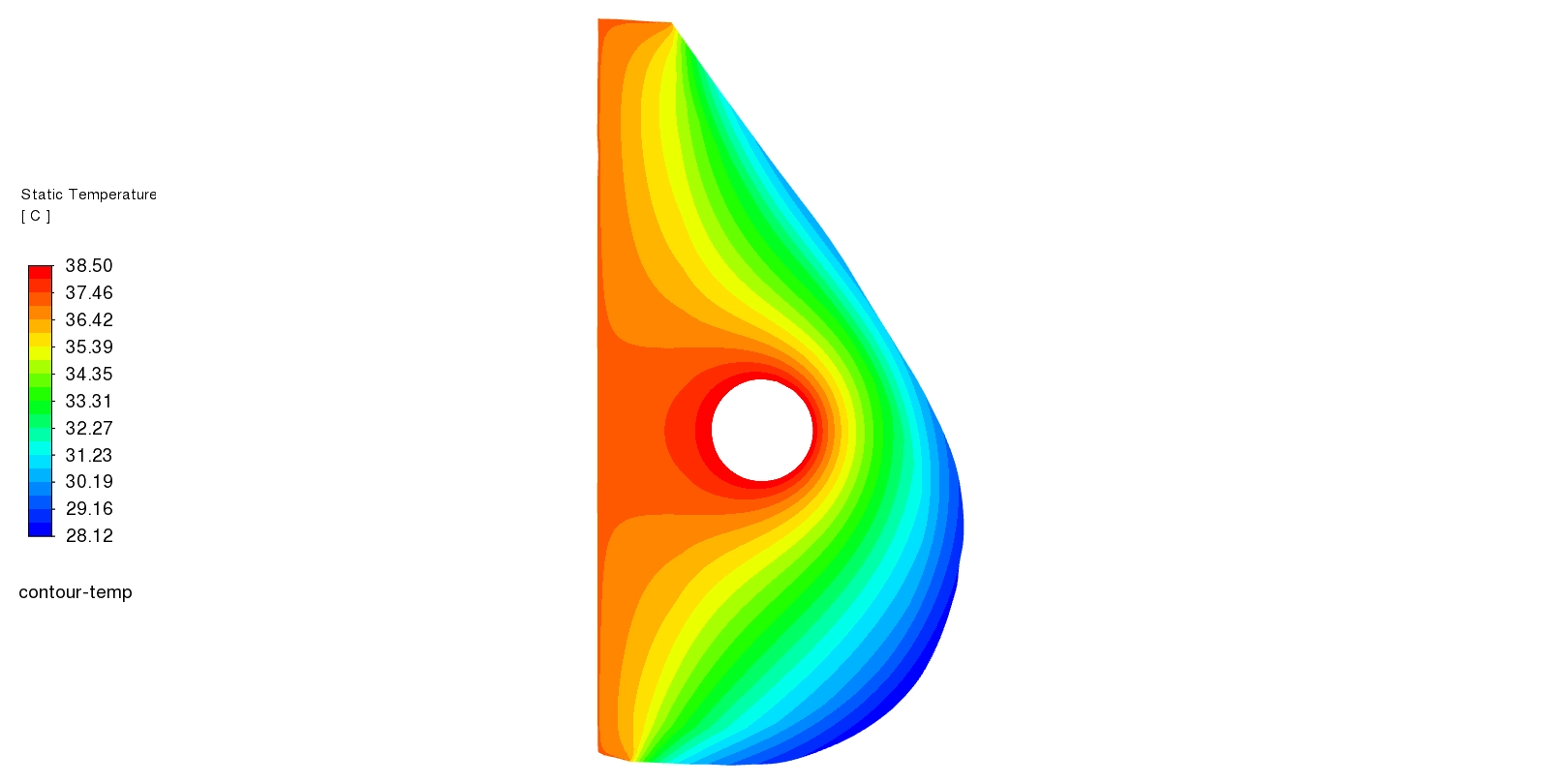
First, we deeply analyze the Static Temperature Contour (Figure 3). The visual data perfectly maps the heat inside the body. The contour shows a bright red spot exactly at the center where the 2 cm tumor lives, reaching a maximum high temperature of 38.5 °C. Moving away from the cancer, the temperature drops smoothly. The middle glandular tissue shows a yellow-green color at 33 to 35 °C, and the outer fat layer cools down to a cyan-green color at 30 to 34 °C. The back muscle layer near the chest stays cool at 28 to 32 °C (blue colors) because it connects to the normal 37 °C body core.
- Critical Biological Discovery: The simulation mathematically proves exactly why the tumor is so hot. The data shows the tumor has a very high blood perfusion rate of 0.0053 1/s. This is much higher than the healthy fat, which has a very slow blood flow of only 0.0002 1/s. This massive difference in blood flow and metabolic activity is the exact reason the cancer generates a dangerous thermal hot spot.
- Ultimate Manufacturer Benefit: Seeing this exact heat map in the Breast Tumor Thermal CFD analysis is incredibly valuable for doctors and engineers. When treating cancer with radiofrequency ablation (RFA), the medical machine must heat the tumor to an extreme 45 to 90 °C to destroy the bad cells. By using this exact Breast Tumor Thermal CFD Simulation data, a medical machine designer mathematically knows exactly how the healthy fat and muscle will absorb the heat. This helps them design better, safer heating probes that successfully burn 100% of the red tumor while perfectly protecting the cool blue healthy tissue from dangerous skin burns.
Figure 3: Static Temperature Contour from ANSYS Fluent (28 °C to 38.5 °C), visualizing the red hot tumor center and the cooler blue muscle layers on the outside.
Frequently Asked Questions (FAQ)
- What is the Pennes bioheat equation?
- It is a famous mathematical formula used inside the CFD software. It perfectly calculates how the flowing blood and the body’s natural metabolism create and move heat through human tissue.
- Why does the tumor show up as a bright red hot spot?
- The tumor is red because it reaches a hot temperature of 38.5 °C. This happens because the cancer cells grow very fast and require a massive blood perfusion rate (0.0053 1/s), which generates much more metabolic heat than healthy fat.









Reviews
There are no reviews yet.