

In our first guide on combustion simulation in ANSYS Fluent, we looked at the basic physics of a flame. Now, we move directly into the software. This second guide is a practical walkthrough of the settings needed to run combustion models effectively.
The first step in any setup is choosing the right approach. You make this decision in the main Species Model dialog box. This panel acts as the control center for your simulation. Your choice here decides which math equations the solver will run. The main options are:
- Species Transport
- Non-Premixed Combustion
- Premixed Combustion
- Partially Premixed Combustion
- Composition PDF Transport
Each path is built for a different type of fire. In the following sections, we will cover the setup for these methods. We will cover how to define your chemical mixture, import reaction files, and configure the solvers. While this guide explains the settings, you can see these applied to real-world engineering challenges in our completed combustion CFD Simulation projects.

Figure 1: The main Species Model dialog box in ANSYS Fluent, where the user selects the fundamental approach for the simulation.
Which Combustion Model Should You Use?
Choosing the right chemistry approach saves a lot of time and prevents solver crashes. Use this quick reference table to decide which setup fits your specific engineering case.
| Your Case | Model | Key Setting |
|---|---|---|
| Fast chemistry, simple fuel | Species Transport + Eddy Dissipation | Set A=4, B=0.5 |
| Fuel and air enter separately | Non-Premixed (PDF) | Build the PDF table first |
| Fuel and air pre-mixed | Premixed (C-equation) | Set flame speed model |
| Both mixed and non-mixed zones | Partially Premixed | Needs PDF table + progress variable |
| Detailed chemistry, slow reactions | EDC | Expensive — reduce mechanism first |
| Pollutant prediction | NOx model | Run after the flame converges |
Setting Up the Species Transport Model
The Ansys Fluent Species Transport approach is a direct way to calculate reacting flows. It tracks every chemical involved in the system. Here is how to set this model up in the software.
Activating the Model and Defining Your Mixture
First, select Species Transport in the Species Model dialog box. Next, define your Mixture Material. This step tells the software the recipe for your fire, including all the chemicals and their reactions. For simple reactions, you might use a pre-defined mixture from the software database, like methane-air. However, for detailed industrial or academic studies, you often need an imported chemical mechanism. You do this using the Import CHEMKIN Mechanism option. For example, in our advanced examples, we study MILD combustion CFD simulation using CHEMKIN mechanism. We also look at methane-air fires using the GRI mechanism, which has 177 chemical reactions. Importing a CHEMKIN file is the standard way to handle heavy chemistry.


Figure 2: Visual representation of a CHEMKIN mechanism used in the Species Transport model to simulate methane-air reactions with intermediate steps.
Types of Reactions: Volumetric vs. Surface
After defining the mixture, you tell the software where the reactions happen. There are two main types:
- Volumetric Reactions: These occur in the fluid volume, like the main flame in a chamber. You enable this for almost all reacting flow setups. The software calculates reaction speeds using the Arrhenius rate equation. As the temperature increases, the reaction rate increases quickly. The speed of these reactions is calculated using the Arrhenius rate equation. This math simply tells the software that higher temperatures increase the reaction speed very quickly.
k = A \cdot e^{-\frac{E_a}{RT}}
- Wall Surface Reactions: These happen only on a solid surface. Engineers use this for special cases like catalytic converters. For specific surface kinetics, you often need a User-Defined Function (UDF). For example, in our Methanol Steam Reforming CFD project, a UDF defines the reaction kinetics on the catalyst wall to produce hydrogen.

Figure 3: Wall reaction study using ANSYS Fluent. In many industrial reactors, the chemical reaction happens on the catalyst surface. To model this correctly, a custom Steam reforming UDF (User-Defined Function) was used.
Choosing the Right Chemistry Solver
Solving hundreds of chemical equations takes heavy computing power, especially when some reactions are thousands of times faster than others. This is known as stiff chemistry. The software provides tools to handle this under the Chemistry Solver option:
- Stiff Chemistry Solver: This built-in solver balances speed and accuracy well. It is the recommended choice for most cases with detailed chemistry.
- CHEMKIN-CFD Solver: This option uses the Ansys CHEMKIN solver, the industry standard for stiff chemistry mechanisms. If your project has hundreds of species, this solver is often required for a stable run.
Modeling Turbulence-Chemistry Interaction (TCI)
Because chemical reactions are highly non-linear, you cannot just use average temperatures to find the reaction speed. You need a way to calculate how turbulent wind mixes with the fire. This is why Turbulence-Chemistry Interaction (TCI) models exist. TCI is the parent category. When you set up your solver, you choose a specific TCI approach based on your limits. The eddy dissipation model / EDC are the two most common choices under this category:
- Mixing-Limited TCI Models
- Eddy Dissipation Model (EDM): This approach ignores slow chemistry. It assumes the fire is controlled entirely by how fast the turbulent wind can mix the fuel and air together.
- Finite-Rate TCI Models
- Eddy Dissipation Concept (EDC): This is an upgrade to the EDM. It includes detailed chemical kinetics. It assumes reactions happen in tiny, highly turbulent “fine structures” and uses heavy math to track them.
- Finite-Rate (No TCI): This option ignores wind effects completely. It is only used for slow, calm laminar flames.

Figure 4: Decrease of a methane mass fraction influence by combustion gas mixture

Figure 5: Temperature profiles depending on the distance
Non-Premixed / PDF Model
The non-premixed approach is highly efficient for industrial furnaces, diesel engines, and gas turbines. Instead of solving a transport equation for every single chemical, the software uses a pre-calculated lookup table called the PDF (Probability Density Function) table. Here is how to set up this model.
Generating the PDF Table: A Chemistry Library
Before you start the main solver, you generate the PDF table. This library contains all the thermochemical data (like species concentrations and temperature) mapped to the mixture fraction. During the run, the software calculates the mixture fraction in each cell and simply looks up the corresponding values in the PDF table. This makes the run much faster and more stable than tracking dozens of individual gases. The table also accounts for the effects of turbulence on the mixture fraction, which automatically handles the turbulence-chemistry interactions.

Figure 6: A sample plot of the mean temperature distribution within the chamber, calculated by the PDF flamelet model.
Setting Up the Model in the Software
The setup process involves three main steps inside the Species Model dialog box.

Figure 7: Key setup tabs for the Non-Premixed / PDF Model, where you define the chemistry source and the composition of the fuel and oxidizer streams.
Step 1: Choose Your Chemistry Source (Chemistry Tab): This tab tells the software how to create the PDF table. You have two main choices under the State Relation list:
- Chemical Equilibrium: This is the simplest method. It assumes chemical reactions are infinitely fast and in perfect equilibrium. It is a good starting point, but it may not be accurate for flames with slow chemistry, like those forming NOx.
- Steady Diffusion Flamelet: This is a more accurate method. It solves detailed reactions for a simple one-dimensional flame to create a flamelet library. This library becomes the source for your PDF table. You need to click Create Flamelet and import a CHEMKIN mechanism. This is the recommended approach for industrial applications. For example, in our Combustion Acoustics using a Non-Premixed Flamelet Model, the flamelet model accurately predicts the flame structure needed for noise analysis.

Figure 8: Combustion Acoustics, Using Broadband Noise Model and Non-Premixed Flamelet Model
Step 2: Define Your Fuel and Air Streams (Boundary Tab): Next, you define what is in your fuel stream and oxidizer stream. In the Boundary tab, you set the species and temperatures.
- Boundary Species: You specify the chemical formula for your fuel (e.g.,
ch4for methane) and your oxidizer (e.g.,o2andn2). - Temperature: You set the inlet temperature for both streams, for example, 300K.
- Specify Species in: You define the composition using either Mass Fraction or Mole Fraction. For air, you specify a mass fraction of roughly 0.23 for
o2and 0.77 forn2.
Step 3: The Importance of Operating Pressure: A critical setting in the Chemistry tab is the Operating Pressure. System pressure heavily impacts the flame. Higher pressure pushes molecules closer together, causing reactions to happen much faster. In systems like internal combustion engines, the pressure is very high, and setting this value correctly is essential. If your system pressure changes significantly, you should also enable the Compressibility Effects option.
Industrial Applications of the Non-Premixed Model
To see how this works in practice, we can look at two specific engineering projects where the fuel and oxidizer enter the chamber separately:
- Aerospace Engineering: In a liquid rocket combustor CFD simulation, liquid fuel and liquid oxidizer inject into the chamber from separate valves. The non-premixed model perfectly captures the fast chemical reactions, predicting the extreme temperature distribution needed to prevent the rocket nozzle from melting.
- Power Generation: In a non-premixed combustion in a swirl burner project, engineers use the PDF table to handle heavy turbulence. The burner spins the air to create a vortex. The PDF model calculates how this swirling wind mixes with the raw fuel, helping engineers predict flame stability and reduce harmful emissions.


Figure 9: The industrial applications of non-premixed combustion model
Premixed Combustion Model
As we discussed in our first guide, premixed fires happen when the fuel and oxidizer mix completely before they ignite. This is standard in lean-premixed gas turbines. For these systems, the software provides a dedicated premixed combustion model. Because the gases are already mixed, this model does not track a mixture fraction. Instead, it tracks the location of the flame front using the premixed combustion c equation (where ‘c’ stands for the progress variable). A value of c=0 means the gas is unburnt, and c=1 means it is fully burnt. When you activate this model, you simply define the properties of the unburnt mixture, like the laminar flame speed, which tells the software how fast the fire spreads.
Partially Premixed Combustion
This is a hybrid setup. It combines the features of both mixed and non-mixed systems. Engineers use partially premixed combustion for burners where some areas are pre-mixed, but other areas burn as separate streams.
To set this up, the software uses advanced lookup tables, such as the Flamelet Generated Manifold (FGM), to map the chemistry. For example, in our methane NOx Formation in Methane Combustion Using Partially Premixed Combustion, this hybrid model accurately finds the high-temperature zones where harmful gases form. It is also required for Gas Turbine Combustor with Effusive Cooling Holes CFD study. In these cases, the model successfully calculates the interaction between the hot flame and the cool protective air injected through the walls.

Figure 10: NOx concentration predicted using the partially premixed model.

Figure 11: Gas Turbine Combustor simulation, analyzing the interaction between the flame and effusive cooling.
Advanced Settings: Composition PDF Transport
For the highest level of accuracy, the software offers the composition pdf transport model. Instead of looking up pre-calculated tables, this model solves a full transport equation for the PDF itself. It does not guess how turbulence and chemistry interact; it calculates it directly. This makes it perfect for predicting local flame extinction and re-ignition.
When setting this up, you choose between two main solvers:
- Lagrangian PDF: This approach tracks thousands of virtual, discrete fluid particles moving through the chamber (using a Monte Carlo method).
- Eulerian PDF: This approach solves the field equations directly on the mesh grid.
If you choose the Lagrangian method, you also configure the Mixing tab. Here, you define how the virtual particles share properties with each other using mathematical mixing models like Curl, IEM (Interaction by Exchange with Mean), or EMST (Euclidean Minimum Spanning Tree). Because of the heavy math, engineers typically reserve this model for academic research or for verifying simpler models.
ANSYS Fluent NOx Model: Fuel Streams and Fuel Species
Predicting Nitrogen Oxides (NOx) is critical for environmental compliance. Because NOx forms much slower than the main fire, you usually solve the main reacting flow first, freeze the flow equations, and then activate the NOx model. The biggest challenge for engineers is setting up the Ansys fluent NOx model fuel streams fuel species correctly. If you get this wrong, the solver will crash or predict zero pollution.
In the NOx panel, you first define the number of fuel streams. For a standard fire with one fuel inlet, this number is 1. If you have a dual-fuel setup, you set it to 2. Next, you define the fuel species for each stream (for example, ch4 or h2). If you type the wrong chemical name, or if the number of streams does not match your actual inlets, the calculation breaks.
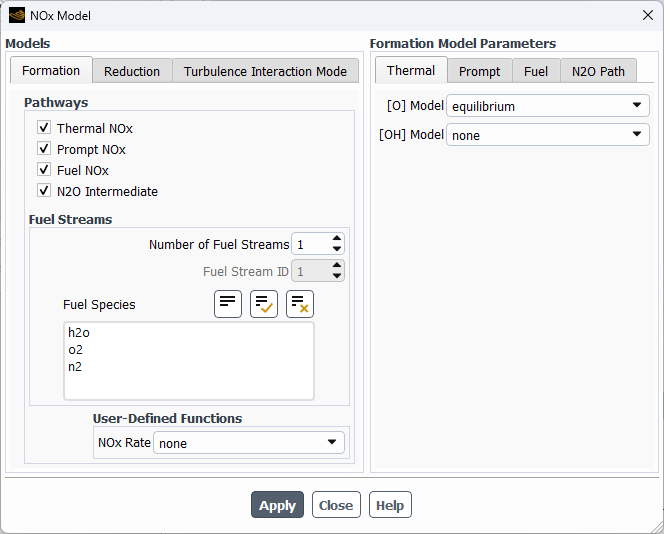
Figure 12: Ansys fluent NOx model fuel streams and fuel species settings panel.
NOx Model Settings Table
| Setting | What it means | Common value |
|---|---|---|
| Number of Fuel Streams | How many separate fuel types enter the chamber. | 1 (for single-fuel burners) |
| Fuel Species | The exact chemical name of the fuel entering the domain. | ch4, h2, or c3h8 |
| NOx Pathways | How the pollution forms (Thermal, Prompt, or Fuel). | Thermal (almost always enabled) |
Real-World NOx Applications and Temperature Sensitivity
Predicting NOx requires highly accurate temperature data, specifically for Thermal NOx. For instance, when studying the hydrogen addition effect on NOx formation CFD, hydrogen enrichment alters the flame shape and peak temperatures. While hydrogen burns cleaner, the higher flame heat can increase Thermal NOx production if not carefully controlled. Similarly, in hydrogen-air combustion CFD simulation, accounting for radiative heat transfer is critical. Since Thermal NOx formation depends heavily on temperature, ignoring radiation models leads to a severe overestimation of NOx levels in the chamber.
As you refine your setup to capture these sensitive chemical reactions, numerical stability becomes a challenge. NOx formation equations are prone to divergence if the time step is too large. To maintain accuracy and prevent crashes, you need to monitor your Courant number (CFL number). Keeping the CFL number in the correct range ensures the solver correctly captures the chemical transport, preventing the unphysical oscillations that often ruin reacting flow studies.

Conclusion
We have covered the practical steps for setting up reacting flows in the software, from basic species transport to advanced PDF tables and NOx prediction. If you are new to this topic and need to review the underlying physics (like the fire triangle and chemical kinetics), get back to the introduction and start with our previous blog.
If your industrial or academic study requires professional assistance, our Order a CFD Project service provides expert simulation setup, troubleshooting, and customized engineering consulting.