

ANSYS Fluent is the world’s leading CFD simulation software. Engineers use it for fluid flow simulation to understand how air, water, and heat move. This process, called CFD analysis, helps design everything from fast cars and airplanes to small electronic devices. It allows us to see invisible things, like how heat spreads inside a computer or how air flows over a wing.
Over the years, the software has changed significantly. New ANSYS Fluent capabilities are added with every update to make simulations faster and more accurate. From the foundational ANSYS Fluent 2019 to the powerful, AI-driven ANSYS Fluent 2025, each release brings unique tools. Understanding these ANSYS Fluent versions is essential. It helps you choose the right update for your specific engineering project.
In this guide, we will explore the history of ANSYS Fluent updates. We will cover the key ANSYS Fluent new features from 2019 to 2025 to help you master CFD simulation.
Quick Comparison: Which Version Do You Need?
| Version Year | Key Feature Highlight | Best Used For |
| ANSYS Fluent 2025 | AI Copilot & Native GPU for Radiation | Thermal Management & Battery Design |
| ANSYS Fluent 2024 | Extreme GPU Acceleration | Aerodynamics & Transient Flows |
| ANSYS Fluent 2023 | Lightweight Setup Mode | Large Assemblies & Systems |
| ANSYS Fluent 2022 | PyFluent (Python Automation) | Hydrogen & Automation |
| ANSYS Fluent 2021 | Expanded Multiphase on GPU | Complex Mixing & Reactions |
| ANSYS Fluent 2020 | Watertight Meshing Workflow | Dirty/Complex Geometry |
| ANSYS Fluent 2019 | Mosaic Meshing Introduction | foundational CFD analysis |

Figure 1: A detailed CFD analysis of a car’s aerodynamics using ANSYS Fluent software, showing how airflow velocity affects performance.
ANSYS Fluent 2025: Thermal Management and AI Integration
ANSYS Fluent 2025 is a major step forward for CFD analysis. It brings big improvements in GPU acceleration, smart AI tools, and better ways to connect different types of physics. These changes make fluid flow simulation faster and help engineers solve harder problems with less effort.
ANSYS Fluent 2025 R2: High Speed and AI Tools
ANSYS Fluent 2025 R2 introduces very fast capabilities, especially for thermal management and mixing fluids (multiphase flow). A big focus is on using the graphics card (GPU) to solve problems much faster.
- Faster Heat Transfer: The Surface-to-Surface (S2S) Radiation model, which calculates how heat moves between surfaces, now runs 2 to 2.5 times faster on GPUs. This is great for simulations with moving parts, like a rotating fan.
- Better Multiphase Flow: The Volume of Fluid (VOF) solver, used for things like water and air mixing, now works fully on the GPU. This makes CFD simulation of liquids much quicker.
- More Physics on GPUs: Models for chemical reactions (Species Transport), combustion, and battery chemistry now run on the GPU. This lowers the cost of complex studies.
ANSYS Fluent 2025 R2 also adds the Ansys Engineering Copilot. This is a smart AI assistant inside the software. It uses AnsysGPT technology to answer your questions and help you find information quickly.

Figure 2: The ANSYS Fluent 2025 R2 Launcher Window, the starting point for setting up advanced CFD simulations.
ANSYS Fluent 2025 R1: Performance Boosts
DANSYS Fluent 2025 R1 made the software more efficient and added GPU acceleration to more areas.
- More GPU Support: This version allowed more physics models to run on the GPU, including acoustics (for noise), radiation, and compressible liquids.
- Battery and Ice Simulation:It improved battery simulation speed and added new models to predict ice build-up on aircraft (Aircraft Icing Models). This helps make planes safer. Speaking of ice, you can learn more about specialized simulations in our CFD study of the roughness effect on an airfoil using ANSYS ICING.

Figure 3: An example of an ANSYS ICING simulation, a specialized tool for studying ice formation on an airfoil.
- Web Interface: The web version of Fluent got better. You can now create a mesh (the grid for simulation) directly in your web browser.
ANSYS Fluent 2024: Extreme GPU Performance and Smart Workflows
ANSYS Fluent 2024 marked a huge shift in CFD simulation. It made simulations incredibly fast using GPU acceleration and introduced smarter ways to work. This version focused on making complex fluid flow simulation accessible and efficient for everyone.
ANSYS Fluent 2024 R2: Unmatched GPU Acceleration and Dynamic Physics
ANSYS Fluent 2024 R2 revolutionized the speed of simulations. The biggest change is Extreme GPU Acceleration.
- Transient Flow: Simulations that change over time (transient flow) are now up to 4 times faster on GPUs. This is critical for aerodynamic analysis of cars or turbomachinery where speed is everything.
- Moving Parts: For simulations with moving parts, like valves or pistons, the software can now handle dynamic meshing on the GPU. This makes solving complex moving boundary problems much quicker. To see the real power of GPUs in action, check out our example: Fluent GPU-Accelerated Simulation of Tesla Cybertruck Aerodynamics.

Figure 4: A visualization of a GPU-accelerated CFD simulation of the Tesla Cybertruck’s aerodynamics in ANSYS Fluent.
ANSYS Fluent 2024 R2 also expanded which physics models can run on the GPU.
- Chemical Reactions: It supports Species Transport for mixing and reactions.
- Acoustics: It includes models for predicting noise (Acoustics FW-H model).
- Multiphase: It handles phase changes like evaporation and condensation.

Figure 5: The ANSYS Fluent 2024 R2 Launcher Window This window is the first step when starting ANSYS Fluent.
For Enhanced Workflows and Usability, ANSYS Fluent 2024 R2 introduced PyFluent for Automation. This Python-based scripting tool allows engineers to automate and customize their ANSYS Fluent workflows, making repetitive tasks faster and more consistent. Improved Post-processing includes new tools and options that make it easier to visualize and extract data from your CFD simulation results. The Turbomachinery Workflow has also been streamlined, making setting up simulations for rotating machines like pumps and turbines more intuitive and faster. In terms of Advanced Physics Modeling, there are continued improvements in battery modeling for thermal management and performance prediction. For combustion, faster and more accurate flamelet models are available. Lastly, free surface flows benefit from better accuracy and stability for Volume of Fluid (VOF) models used in free surface flow applications. To further accelerate complex simulations and harness the power of modern hardware, ANSYS Fluent offers GPU acceleration. Discover how to effectively utilize your GPU with ANSYS Fluent in this guide: How to Use GPU in ANSYS Fluent?

Figure 6: A blog from a CFDLAND guide, illustrating a key step in setting up GPU acceleration for an ANSYS Fluent simulation.
ANSYS Fluent 2024 R1: Smarter Meshing
ANSYS Fluent 2024 R1 built a strong foundation by adding more physics to the GPU and improving meshing.
- Combustion on GPU: This version enabled the Flamelet Generated Manifold (FGM) model on the GPU. This makes simulating fire and engines much faster. You can master these techniques with our Combustion CFD Simulations training.

Figure 7: Examples of combustion CFD simulation, a key application accelerated by ANSYS Fluent 2024’s GPU capabilities
- Multiphase on GPU: It allowed Volume of Fluid (VOF) simulations (like water waves) and Discrete Phase Model (DPM) (like sprays) to run on the graphics card.
- Automated Meshing: The Automated Watertight Meshing Workflow made preparing “dirty” or imperfect CAD models much easier. It saves a lot of time in the pre-processing stage.
ANSYS Fluent 2023: Refined Simulations and Acoustics
ANSYS Fluent 2023 made CFD simulation more efficient and flexible. It focused on making the solver faster using GPUs and improving how engineers set up complex problems. This version also added better tools for predicting noise (acoustics).
ANSYS Fluent 2023 R2: Speed and Smart Setup
ANSYS Fluent 2023 R2 introduced tools to reduce simulation time and simplify work.
- Lightweight Setup Mode: This is a very useful feature. It allows you to open and change simulation settings—like models or monitors—without loading the heavy mesh. This makes opening huge files (even 6 billion cells) extremely fast, often in under 80 seconds.
- Faster GPU Solver: The multi-GPU solver became much stronger. It added support for Sliding Mesh (for rotating parts), compressible flows, and Combustion CFD models. This means you can solve complex engine or turbine problems using fast graphics cards.
- Faster Heat Transfer: A new method for calculating heat in solid parts (Conjugate Heat Transfer) is now 2-3 times faster. This is vital for thermal management projects.

Figure 8: The ANSYS Fluent 2023 R2 Launcher Window, featuring the new Lightweight Setup Mode for faster workflow.
ANSYS Fluent 2023 R2 also introduced Enhanced Meshing and Geometry Workflows. The watertight geometry and fault-tolerant meshing workflows now fully support body labels from CAD software like Ansys DesignModeler or SpaceClaim. This makes it much easier to select and control multiple parts of a geometry for meshing and sizing controls. For dynamic mesh simulations (with moving parts), Dynamic Layering for Polyhedral Cells allows the layering method to work with prismatic polyhedral cells in 3D, making these complex setups more robust. An Improved Wall Distance Calculation with a new Laplacian approach offers a memory-saving option for very large cases.
The release also included New and Improved Physics Models. An Empirical Battery Swelling Model is now available for NTGK and ECM battery models, aiding in battery design and thermal management. New Hydrogen and Combustion Models, including the Thickened Flame model for Hydrogen and Turbulent Premix combustion, were added. Weak Ionization for Hypersonic Flows saw enhancements to improve temperature results by accounting for weak ionization. For species transport with electrochemical reactions, Corrosion Modeling with a Water Corrosion Pre-tool helps model corrosion. Additionally, Expanded DPM Capabilities ensure that the dynamic interaction range and contour plots of particle phase properties are fully supported for Discrete Phase Model (DPM) simulations. Finally, regarding User Experience and Automation, the PyFluent Expansion gave access to more solver settings for various physics like DPM, radiation, and species transport, helping with automation. A new ECAD Import for PCBs workflow allows direct import of ECAD data, streamlining printed circuit board (PCB) simulations for electronics cooling. Also, simulation reports can now be exported directly to PowerPoint.

Figure 9: Discrete Phase Model (DPM) simulation examples showing particle tracking capabilities in ANSYS Fluent 2023.
ANSYS Fluent 2023 R1: Expanding GPU Power
ANSYS Fluent 2023 R1 continued to move more physics to the GPU.
- Native GPU Solver: This version allowed the GPU solver to handle Non-Conformal Interfaces. This is important when connecting different mesh parts that don’t match perfectly. It also added support for Species Transport and combustion.
- Better Meshing: The Watertight Geometry workflow became better at handling “dirty” CAD models. It added new options to control mesh quality, making the setup for fluid flow simulation easier.
- High-Speed Flows: For engineers working on very fast aircraft, this version improved how shock waves are visualized (Schlieren contours) and how cooling films on turbine blades are modeled.
ANSYS Fluent 2022: Acoustic Modeling and Automation
ANSYS Fluent 2022 was a very important year. It prepared the software for GPU acceleration and introduced smarter ways to work. This version focused on making CFD simulation faster and expanding into new physics areas like acoustic modeling. It`s highly recommended to see our Acoustic CFD Library which is all a CFD engineer need to learn aeroacoustics and acoustic analysis.

Figure 10: Acoustic simulation examples highlighting noise prediction capabilities in ANSYS Fluent CFD analysis.
ANSYS Fluent 2022 R2: Hydrogen and GPUs
ANSYS Fluent 2022 R2 started a big shift toward using GPU technology. It also added tools for important industrial challenges like Hydrogen production.
Multi-GPU Beta: This was the first test of the multi-GPU solver. It showed that just six GPUs could be as fast as 2,000 CPU cores for some fluid flow simulations. This was a huge step for speed.
Hydrogen Solutions: New models helped simulate Hydrogen production (electrolysis) and hydrogen combustion. This is critical for clean energy projects.
PyFluent Introduction: A new tool called PyFluent allowed engineers to control Fluent using Python scripts. This makes it easy to automate boring tasks.
This version also improved simulations that change over time (transient flows) and added better tools for aerodynamic analysis.
ANSYS Fluent 2022 R1: Advancing Automation and Core Physics
ANSYS Fluent 2022 R1 made CFD simulation more automated and reliable.
- PyFluent Official Release: Python scripting became fully available. This helps engineers create custom workflows for their specific needs.
- Better Meshing: The Watertight Geometry Workflow was improved. It made creating a mesh for complex shapes with small gaps much easier.
- Acoustic Modeling: This version improved models for predicting noise. If you need to study sound, such as noise from a fan or wind, these tools are essential. You can see examples of this in our Acoustics CFD Simulation projects.
ANSYS Fluent 2022 R1 also improved models for battery thermal management to predict overheating and aging.

Figure 11: Examples of battery thermal management simulations, showcasing the advanced CFD analysis capabilities in ANSYS Fluent 2022.
ANSYS Fluent 2021: Multiphase and User Control
ANSYS Fluent 2021 made CFD simulation easier to control and faster for complex fluids. It focused on improving the user interface and using GPUs for mixing different fluids (multiphase flow).
ANSYS Fluent 2021 R2: Better Performance
ANSYS Fluent 2021 R2 gave engineers more control over their work.
- Better Meshing: The tools for creating the mesh (Watertight Geometry Workflow) got better. It became easier to mesh complex shapes without errors, which saves time in pre-processing.
- Visualizing Results: It added better tools to see your results. You can create better reports and charts to understand thermal management or flow data quickly.
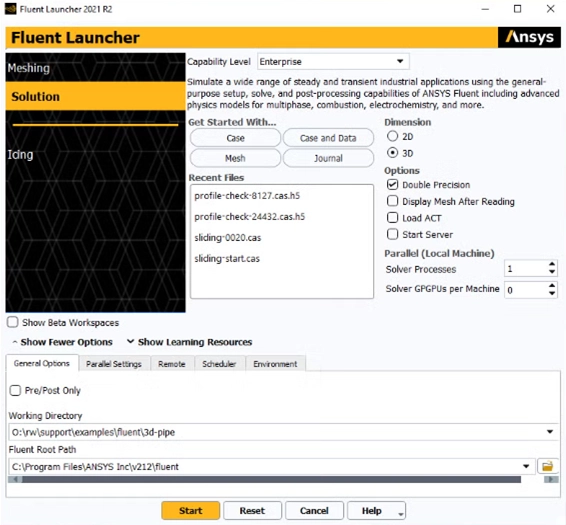
Figure 12: The ANSYS Fluent 2021 R2 Launcher Window, featuring improved tools for managing simulation data.
ANSYS Fluent 2021 R1: Multiphase on GPU
Focusing on an intuitive user experience, ANSYS Fluent 2021 R1 significantly improved the interface ANSYS Fluent 2021 R1 improved the look of the software and added speed for specific flows.
- Multiphase on GPU: This version started using GPU acceleration for multiphase flows. This is great for simulating things like water mixing with air or oil moving in a pipe.
- New Interface: The user interface became much cleaner. You can now open different windows for specific parts of your model. This makes it easier to focus on one area during fluid flow simulation.
- Embedded Reports: You can see graphs and reports right inside the main window while the simulation runs.

Figure 13: The ANSYS Fluent 2021 user, where engineers set up and control Multiphase CFD simulation projects to understand fluid behavior.
ANSYS Fluent 2020: Better Interface and Meshing
ANSYS Fluent 2020 was a big step for making CFD simulation accessible. It introduced major changes to how the software looks and how it handles “dirty” geometry (models with small errors).
ANSYS Fluent 2020 R2: Smart Meshing and Batteries
ANSYS Fluent 2020 R2 introduced smarter meshing tools and new physics for specialized tasks.
- Watertight Mesh: The Watertight Mesh and Fault Tolerant Meshing workflows were greatly improved. They allow engineers to fix complex CAD models automatically. This saves a lot of time in the pre-processing stage.
- Battery Modeling: This version added better tools for battery simulation. It helps engineers predict heat and performance, which is critical for thermal management in electric cars.
- Custom Expressions: You can now write your own math expressions for material properties. This gives you more flexibility for complex CFD analysis.

Figure 14: The ANSYS Fluent 2020 R2 Launcher Window, the first step for starting simplified CFD workflows.
ANSYS Fluent 2020 R1: New Launcher and Graphics
ANSYS Fluent 2020 R1 focused on being easy to use. It launched a completely new look for the software.
- New Launcher: The simplified launcher made it easy to choose your working mode. It helps both new and experienced users start a fluid flow simulation quickly.
- Better Graphics: The visual window got an upgrade. It added shadows, reflections, and better lighting. This makes it easier to see and understand your model.
- Quick Edit Panel: A new panel allowed users to change settings directly in the graphics window, speeding up the setup process.

Figure 15: The ANSYS Fluent 2020 R2 launcher, a significant release for Fluid-Structure Interaction (FSI) and advanced battery modeling in CFD analysis.
ANSYS Fluent 2019: The Start of Modern CFD
ANSYS Fluent 2019 was a very important release. It focused on making CFD simulation easier and more efficient. It introduced a new type of meshing and started the journey towards using GPUs to make simulations faster.
ANSYS Fluent 2019 R2: Streamlined Workflows and Advanced Meshing
Building on earlier foundations to make CFD analysis smoother, ANSYS Fluent 2019 R2 added key capabilities that streamlined the engineering workflow.
- Improved User Experience and Workflow: The way engineers worked with ANSYS Fluent became faster and more intuitive. Tasks were easier to find and complete, making the CFD simulation process more efficient.
- Enhanced Meshing Capabilities: Further improvements were made to meshing, especially for complex geometries. This helped create better quality grids faster, which is key for accurate fluid flow simulation. You can explore foundational ANSYS Fluent training and CFD analysis techniques on cfdland.com.
ANSYS Fluent 2019 R2 focused on making the entire simulation process more user-friendly and robust.
ANSYS Fluent 2019 R1: Mosaic Meshing
ANSYS Fluent 2019 R1 was a landmark version that introduced huge changes.
- Mosaic Meshing: This was a new technology that changed meshing forever. Mosaic Meshing automatically combines different types of mesh cells. This creates high-quality meshes for complex designs very quickly.
- Early GPU Use: This version was the first to use GPU acceleration. It was only for some parts of the solver, but it was the start of making Fluent much faster.
- New Expressions: More flexible ways to define inputs and check results were added. This gave engineers more control over their fluid flow simulation.

Figure 16: An example of meshing in ANSYS Fluent, showing the grid needed for any fluid flow simulation since version 2019.
Conclusion: How to Choose the Right ANSYS Fluent Version
We have seen how ANSYS Fluent changed from version 2019 to 2025. Each update made CFD simulation more powerful, faster, and easier to use. To master ANSYS Fluent, you should use official guides like the ANSYS Fluent 2024 User Guide. These guides explain everything step-by-step. For hands-on learning, websites like CFDLAND offer tutorials that help you practice what you learn.
How to Choose the Best ANSYS Fluent Version
Choosing the right ANSYS Fluent version depends on your specific needs. Here are some key points to consider:
- Project Type:
- If your project needs advanced thermal management or heat sink design, ANSYS Fluent 2025 R2 is a strong choice.
- For very fast transient fluid flow simulation using GPUs, ANSYS Fluent 2024 R2 offers huge speed benefits.
- If acoustic modeling or noise prediction is critical, versions from ANSYS Fluent 2022 R1 onwards are specialized.
- For multiphase flow or complex Fluid-Structure Interaction (FSI), versions like ANSYS Fluent 2020 R2 and 2021 R2 offer robust tools.
- Computational System: Newer versions often use GPU acceleration more effectively. If you have powerful GPUs, a newer version will likely run simulations much faster. Older systems might be better suited for slightly older versions, but always check the system requirements. To ensure optimal performance and compatibility with your chosen ANSYS Fluent version, it’s crucial to be aware of the system requirements. For detailed information on these specifications, refer to: Ansys System Requirements

Figure 17: A guide to help you choose the best ANSYS version based on your computer hardware and project needs.
- Specific Features: Look closely at the new capabilities introduced in each release. For example, if Mosaic meshing is important for your geometry, ANSYS Fluent 2019 R1 was a key release.
- Compatibility: Ensure the chosen version is compatible with other software you use or with project requirements from clients.
By carefully considering these factors, you can select the ANSYS Fluent version that best fits your project and helps you achieve the most accurate and efficient CFD analysis.
FAQ
- What is ANSYS Fluent used for? ANSYS Fluent is a powerful tool for CFD simulation. It helps engineers study how fluids like air and water move and how heat transfers. It is used to design cars, electronics, and airplanes.
- Which ANSYS Fluent version is best for a beginner? Newer versions like ANSYS Fluent 2024 or 2025 are great for beginners. They have a friendly interface and smart tools that make meshing in ANSYS Fluent much easier.
- How do I choose the best ANSYS Fluent version? Think about your project. If you need to study noise (acoustic modeling), use ANSYS Fluent 2022 or newer. If you need very fast GPU acceleration, use ANSYS Fluent 2024 R2. Also, check your computer’s power.
- Do I need a powerful computer for ANSYS Fluent 2025? For simple models, a normal computer is okay. For a complex CFD simulation, a powerful computer with a good GPU (graphics card) is needed to use the new features.
- Where can I find the ANSYS Fluent 2024 user guide? You can find the ANSYS Fluent 2024 user guide in the official ANSYS documentation. It has detailed information for your fluid flow simulation.
- What are the main new features in ANSYS Fluent 2025 R2? ANSYS Fluent 2025 R2 is focused on thermal management and heat sink design. It has faster tools for electronics cooling and a new AI assistant to help you work.
- Did ANSYS Fluent 2023 improve sound simulation? Yes, ANSYS Fluent 2023 made big improvements in acoustic modeling. It helps engineers predict noise from fluid flow more accurately.
- Is GPU acceleration important for ANSYS Fluent? Yes, GPU acceleration is very important. It uses your graphics card to make CFD simulation much faster, especially for large and complex models.
- Is meshing easier in newer ANSYS versions? Yes. Meshing in ANSYS Fluent is much easier now. Newer versions have automatic tools that create good meshes for complex shapes much faster than old versions like ANSYS Fluent 2019.
- Where can I find free ANSYS Fluent training? Many websites offer free tutorials. For example, CFDLAND has many free step-by-step simulations to help engineers learn ANSYS Fluent and improve their skills.