



Fresh air is essential for a healthy life. In tall buildings, using big fans to move air costs a lot of electricity. A better way is to use “Natural Ventilation.” This method uses the heat of the sun and the physics of air to move fresh air through the building automatically. One of the best designs for this is using a large central space called an “Atrium.” To design this correctly without guessing, engineers use Natural Ventilation In Buildings CFD simulation.
This project is a Natural Ventilation In Buildings fluent tutorial. We will teach you how to simulate the airflow in a high-rise building with an atrium. We use ANSYS Fluent to see the invisible movement of air caused by heat. By performing this Natural Ventilation In Atrium Buildings Simulation, we can prove that the design works. For more lessons on building climate control, please visit our HVAC tutorials. The building geometry is based on the research by Fini and Moosavi [1].
- Reference [1]: Fini, Ali Shafiei, and Ali Moosavi. “Effects of “wall angularity of atrium” on “buildings natural ventilation and thermal performance” and CFD model.” Energy and Buildings121 (2016): 265-283.
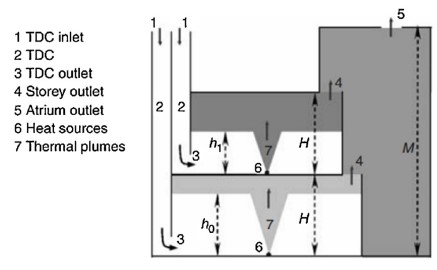
Figure 1: The geometry of a two-story building connected to a central atrium chimney. [1].
Simulation Process: Modeling Buoyancy and Grid Setup
To start this Natural Ventilation In atrium Buildings fluent simulation, we created a 2D model. The model shows a multi-story building connected to a tall vertical shaft, which is the atrium. The mesh (grid) is very important. We used a Structured Grid to fill the geometry. Structured grids use simple squares and rectangles. This makes the calculation faster and gives very accurate results for airflow in rooms.
In the ANSYS Fluent setup, the most important setting is gravity. We must turn on gravity to simulate “Buoyancy.” Buoyancy is the force that makes light things float and heavy things sink. In air, hot air is lighter than cold air. We set the boundary conditions to simulate a warm day where the building absorbs heat. This heat is the fuel for our Natural Air Engine. The software solves the equations to show how this heat creates the Stack effect simulation that drives the ventilation.
Post-processing: Analysis of the Stack Effect
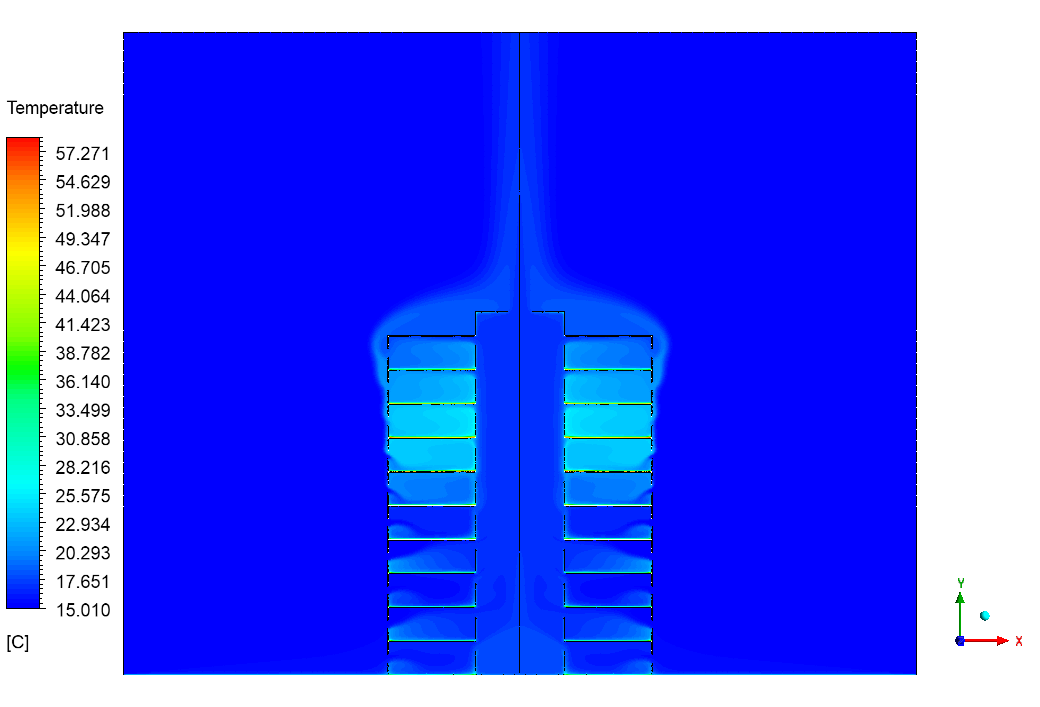
To truly understand the results of this Natural Ventilation In Buildings CFD simulation, we must look at the cause and effect. The cause of all the movement is Temperature. We can see this clearly in the Temperature Contour (Figure 3). The colors tell the story. Near the floor and the inlets, the color is blue. The data shows this air is cool, between 290 K and 295 K. As the air stays in the building, it picks up heat from the sun and the occupants. The color changes to green and yellow near the ceiling and in the atrium. The data shows this warm air reaches 300 K to 310 K.
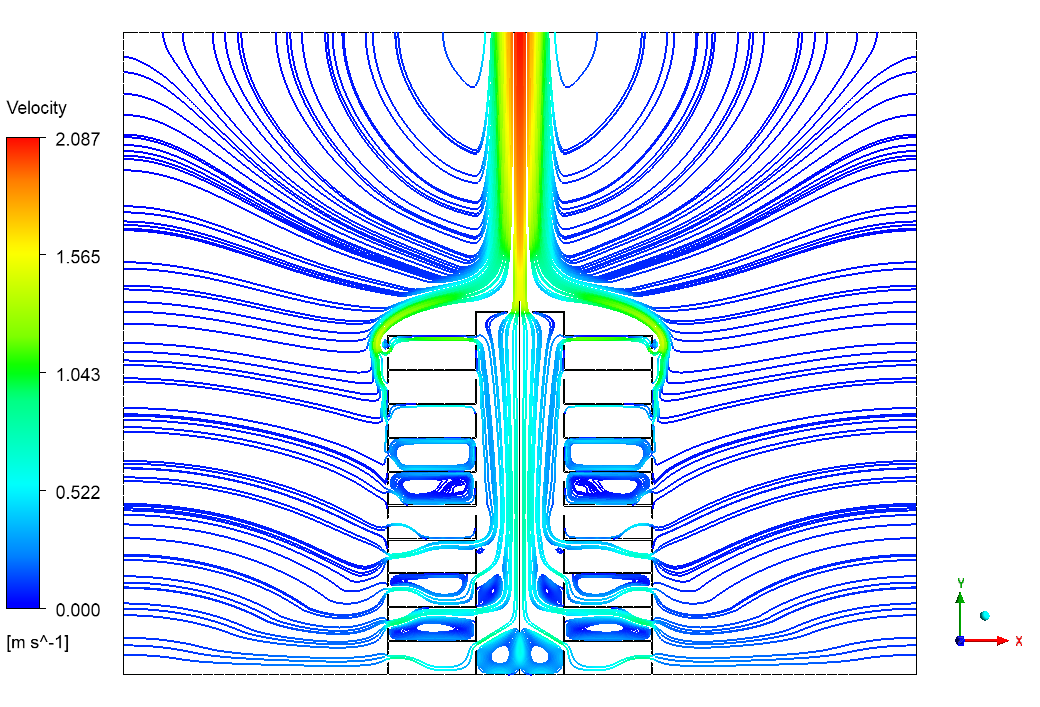
This temperature difference is the key. Because the air at 310 K is hotter, it is less dense (lighter) than the cool air at 290 K. This light air naturally wants to float up. This upward movement is the “Stack Effect.” We can see the power of this effect in the Velocity Contour (Figure 2). The red color in the central atrium shows the air moving very fast. The simulation data confirms that the updraft velocity reaches 2 m/s. This is a strong speed for natural air.
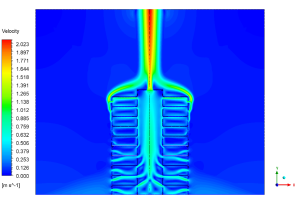
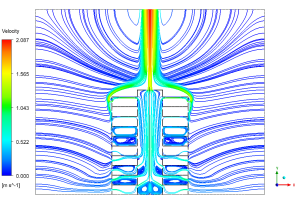
Figure 2: Velocity streamlines showing the path of fresh air entering the rooms and exiting the atrium.
This fast-moving air in the atrium acts like a vacuum cleaner. As the hot air rushes up the chimney at 2 m/s and leaves the building, it creates a suction force at the bottom. This suction pulls fresh, cool air into the rooms through the side windows. The light blue streamlines in Figure 2 visualize this path perfectly. They show fresh air entering, mixing with the room air, and then being pulled into the atrium chimney to be exhausted. This proves that the Natural Ventilation In Atrium Buildings Simulation is successful. The design effectively uses the simple physics of hot air rising to create a continuous, energy-free loop of fresh air for the residents.
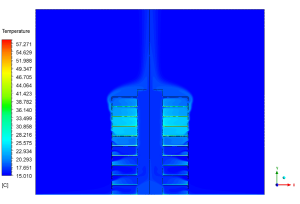
Figure 3: Temperature contour showing the gradient from cool floor (290 K) to warm ceiling (310 K).
Key Takeaways & FAQ
- Q: What drives the airflow in this building?
- A: The Stack Effect. The difference in temperature between the inside and outside creates a pressure difference that moves the air.
- Q: How fast does the air move?
- A: The Natural Ventilation In Buildings fluent results show the air accelerates to 2 m/s inside the central atrium chimney.
- Q: Why is the temperature important?
- A: The temperature difference (from 290 K to 310 K) creates the density difference needed for buoyancy. Without heat, there is no ventilation.






Reviews
There are no reviews yet.