


Designing drone propellers and massive wind turbines is a very difficult engineering challenge. If you try to draw a highly detailed, spinning 3D blade in a computer, the software will take weeks to calculate the airflow because it requires millions of tiny calculation cells. To solve this problem, engineers use an Actuator Disk CFD simulation. Instead of drawing real physical blades, we place a completely flat, invisible circle (a disk) in the air. We use a math rule called Blade Element Momentum (BEM) to make this invisible circle push the wind exactly like a real spinning propeller. This is known as the Virtual Blade Model.
This report is a complete Virtual Blade Model fluent educational tutorial. We use ANSYS Fluent to visualize the invisible aerodynamic forces. By mastering this CFD Analysis of Actuator Disk, designers can test hundreds of different rotor shapes in just a few hours with 80% to 95% accuracy compared to real blades. For more easy lessons on simulating propellers, fans, and aerodynamic forces, please explore our Turbomachinery tutorials.

Figure 1: Schematic of a blade modeled with an actuator disk, showing how physical blade geometry is simplified into a thin computational plane.
Simulation Process: Structured Meshing and Virtual Blade Setup
To build this Actuator Disk ANSYS Fluent project, we created a large 3D cylindrical wind tunnel. We used a very clean, structured grid containing exactly 1,036,071 cells. We packed the smallest cells right next to the invisible disk to catch the sharp changes in wind speed.
The physics setup for this Actuator Disk fluent simulation is highly detailed. We activated the Virtual Blade Model and divided our invisible disk into 10 rings (from the center hub out to the tip, which has a radius of 0.118 meters). We set the disk to spin at an incredibly fast 1252.88 rad/s (roughly 11,960 RPM) with the blades tilted at a 25-degree pitch angle. The wind blows into the tunnel at 40 m/s. Because the blade spins so fast, we used “Ideal-Gas Air” to allow the air to compress. Finally, we used the Spalart-Allmaras turbulence model with a special curvature correction to make sure the software correctly calculates the violently spinning wind. This complete setup allows the computer to solve the equations and predict the rotor power perfectly without needing real 3D blades.


Figure 2: Structured grid – whole and in cross slice, displaying the high-quality hexahedral mesh with fine cells near the rotor region to capture the flow gradients.
Post-processing: Rotor Forces and Lift Physics
To understand how a propeller works, we must analyze the exact forces it creates. The software calculated the overall performance of our virtual rotor, shown in the table below:
| Performance Parameter | Value | Unit |
| Rotor Thrust (main_rotor_thrust) | 18.659556 | N |
| Rotor Pressure Integral (int_acdisk) | -8.6929394 | (Pa)(m²) |
The table shows the rotor creates exactly 18.65 N of pushing force (Thrust). But where does this thrust come from? Look at the Lift Coefficient (CL) contour (Figure 3).
- At the exact center (the hub), the color is dark blue. This means the lift is zero. Why? Because the center of a spinning circle barely moves, so it cannot push the air.
- As you move outward to the middle ring (60-80% of the radius), the speed increases perfectly. This middle section glows red, reaching the maximum lift of 0.35 to 0.39. This proves that the middle of the blade does almost all the heavy lifting.
- However, at the very outer tip, the lift drops back down to 0.23 to 0.31. This happens because high-CFD Analysis of Actuator Disk, a drone manufacturer knows they must make the middle of their physical blade strong to handle the heavy 18.65 N load, while keeping the tips thin.


Figure 3: Drag coefficient (Cd) and Lift coefficient (Cl) distribution on the actuator disk plane, proving the middle of the blade generates the maximum aerodynamic lift.
Next, we look at how the rotor destroys the clean incoming wind. Look at the Velocity Contours and Pathlines (Figure 4). The wind enters at a clean 40 m/s. When it hits the disk, it speeds up slightly to 43-46 m/s. However, look directly behind the center of the rotor. The wind slows down significantly to 38-42 m/s. This slow zone is called the Wake Deficit. This is basic cause and effect: because the rotor took energy out of the wind to create 18.65 N of thrust, the wind now has less energy, so it must slow down.
Remember how the air spilled over the edge of the blade tips, causing the lift to drop? That spilled air does not just disappear. It rolls up into a violent, spinning tornado. You can clearly see these Helical Tip Vortices shooting off the edges of the disk in bright red, reaching extreme speeds of 51.47 m/s.
For wind farm engineers, this Actuator Disk fluent analysis is critical. The contours prove that right behind a turbine, the wind is slow (wake deficit) and the edges are violently turbulent (tip vortices at 51 m/s). This visually tells engineers exactly how far away they must build the next wind turbine so it is not destroyed by this bad air.

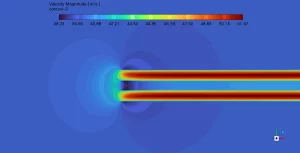
Figure 4: Velocity pathlines and contours showing the slow wake deficit (38-42 m/s) in the center, and the violent helical tip vortices (51.47 m/s) spinning off the edges.
Key Takeaways & FAQ
- Q: What is the Virtual Blade Model?
- A: It is a math tool in ANSYS Fluent that uses Blade Element Momentum (BEM) to simulate a spinning propeller as a flat, invisible disk, saving millions of calculation cells.
- Q: Why does the middle of the blade create the most lift?
- A: The center hub moves too slowly to create lift, and the outer tips lose lift because air spills over the edge. The middle (60-80% radius) has the perfect balance of high speed and no spillage, hitting a max of 0.39.
- Q: What is an aerodynamic wake deficit?
- A: When a rotor creates thrust, it steals energy from the wind. This causes the wind directly behind the rotor to slow down (dropping from 40 m/s to 38 m/s in our simulation).





1 review for Actuator Disk CFD Simulation: ANSYS Fluent Virtual Blade Model Tutorial
memo –
Hello i would like to know id this case can be made using ansys fluent 2025 ?