


We spend almost 90% of our lives inside buildings. Because of this, the indoor air quality must be excellent. The best way to check this is by performing a CFD Analysis of Mean Age of Air. The concept is simple: the Age of Air is the time a particle of air stays inside a room before leaving. If the age is low, the air is fresh and healthy. If the age is high, the air is stale and full of Carbon Dioxide (CO2) or viruses. We cannot measure this easily in real life, so we use ANSYS Fluent to simulate it.
In this tutorial, we use a special method called the Mean Age of Air UDF. Standard simulation tools only show wind speed. They do not track time. To fix this, we write a small code (UDF) that acts like a stopwatch for every air particle. This helps engineers find dangerous Dead Zones in offices or homes where dirty air gets trapped. This simulation is essential for designing safe ventilation systems. For more examples of building airflow, please explore our HVAC tutorials.

Figure 1: Illustration showing the importance of Home Air Quality and how indoor pollutants affect human health in residential spaces.
Simulation Process: Age of Air UDF and Mesh Setup in ANSYS Fluent
For this CFD Analysis of Mean Age of Air, we created a realistic 3D model. The geometry consists of four rooms arranged in a straight line (a row). We placed the building at an angle to the incoming wind. This is very important because, in real cities, the wind almost never hits a wall at a perfect 90-degree angle. We generated a high-quality mesh using Fluent Meshing. The final grid has 1,504,687 polyhedral cells. We chose polyhedral cells because they have many sides. This makes the calculation much more accurate than using simple square blocks, especially for complex shapes like windows.
We set up the physics to simulate natural ventilation. We set the wind speed at the inlet to 2.5 m/s. To calculate the age, we used a User Defined Function (UDF) written in C language. This code creates a User Defined Scalar (UDS). Mathematically, it tells ANSYS Fluent to add 1 second to the age of the air for every second of real-time travel. We ran the simulation until the values stopped changing. This ensures our map of the air quality is stable and accurate.
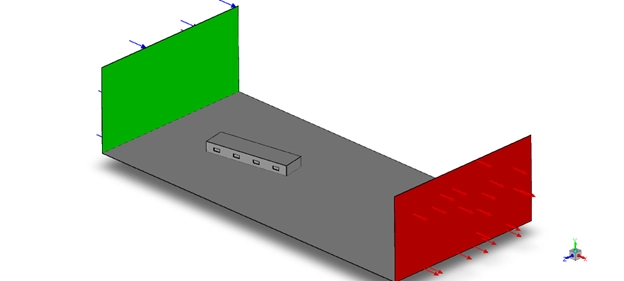
Figure 2: 3D Geometry Model of the building consisting of four rooms arranged in a row, oriented at an angle to the incoming wind for the CFD Analysis.
Post-processing: CFD Analysis of Mean Age of Air and Stagnation Zones
Here, we will analyze the results like an engineer to judge if this building’s design is safe. First, let’s look at the Velocity Contour in Figure 5. The wind arrives from the left at high speed. As it hits the building, it has to go around it. This creates a large, dark blue area on the right side of the building. This is called a Wake Region. Think of a large rock in a fast-moving river. Behind the rock, the water is calm and slow. It is the same with our building. The wind speed in this wake region drops to almost zero. This is a critical clue.
Now, let’s look at the most important image for health, the Mean Age of Air Contours in Figure 3. Room 1 (The first room on the left): The color here is Yellow, which means the age is low, only about 10-14 seconds. This is Excellent Ventilation. The strong wind directly hits this room, enters the window, and flushes out all the old air very quickly. The air quality here is very good.
Rooms 2 and 3 (The middle rooms): The color starts to change to Orange. The age of the air increases to 18-25 seconds. The ventilation is getting worse. The air is staying inside for longer. This is because these rooms are partly in the “shadow” of the first room. The wind has already lost some of its energy.
Room 4 (The last room on the right): This room is colored Deep Red. The Mean Age of Air here is 35 seconds. Critical Design Failure: This is a Stagnant Zone, or a Dead Zone. This room sits completely inside the low-velocity wake region we saw in Figure 5. The wind has no energy left to push fresh air into this room. What this means for a person: If someone is working or sleeping in Room 4, they are breathing in the same air over and over. The from their own breath builds up in the room. This can cause headaches, sleepiness, and a lack of focus. It is a very unhealthy environment.
This CFD Analysis of Mean Age of Air proves that this design is unsafe for natural ventilation. The first room is great, but the last room is dangerous. To fix this Poor Design, an engineer must install a mechanical exhaust fan or an air duct that specifically targets Room 4 to pull the old air out and force fresh air in.

Figure 3: Age of Air (Scalar 0) Contours inside the rooms. The color scale shows fresh air (Yellow) in the first room and stale air (Red) in the last room.

Figure 4: Velocity Streamlines colored by magnitude, visualizing the wind flow of 2.5 m/s approaching the building and the wake zone formed behind it.


Figure 5: Velocity Contours, highlighting the deceleration of wind as it hits the building walls and the low-velocity regions between the rooms.
Key Takeaways & FAQ
- Q: What is a “Wake Region”?
- A: It is an area of very slow-moving air that forms behind an object, like a building, that is blocking the wind. Rooms located in this region will have very poor ventilation.
- Q: Why is the last room the most dangerous?
- A: Because it is located in the building’s wake region. The wind has lost all its energy by the time it reaches the last room, so it cannot push any fresh air inside.
- Q: What is the solution for the “Red” room?
- A: Natural wind is not enough. The design must be changed to include a mechanical fan or air duct that forces fresh air into the last room and pulls the old, stale air out.









Reviews
There are no reviews yet.